java4all@1986 java. Powered by Blogger.

>> Tuesday, June 24, 2014

Q. What does reentrancy mean regarding intrinsic or explcit locks?
A. Reentrancy means that locks are acquired on a per-thread rather than per-invocation basis.
Example : 

    public synchronized void method1(){ 
      //intrinsic lock is acquired 
      operation1(); //ok to enter this synchronized method  
                    //as locks are on per thread basis 
      operation2(); //ok to enter this synchronized method  
                    //as locks are on per thread basis  
      //intrinsic lock is released   
    } 
     
    public synchronized void operation1(){ 
        //process 1 
    } 
     
    public synchronized void operation2(){ 
        //process 1 
    } 


In Java, both intrinsic and explicit locks are re-entrant.

Q. If 2 different threads hit 2 different synchronized methods in an object at the same time will they both continue?
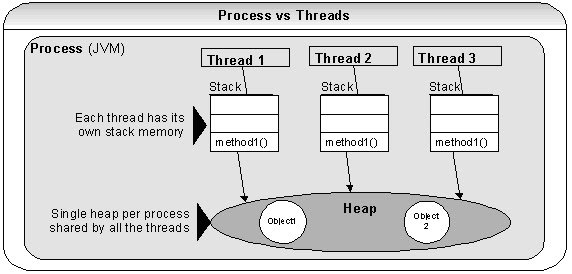
A. No. Only one thread can acquire the lock in a synchronized method of an object. Each object has a synchronization lock. No 2 synchronized methods within an object can run at the same time. One synchronized method should wait for the other synchronized method to release the lock.   This is demonstrated here with method level lock. Same concept is applicable for block level locks as well.




Read more...

1.Java multi-threading Q&A

1.Java multi-threading Q&A

A) If you are going for Java interviews to work on large scale systems, expect lots of Java multi-threading interview questions.

2)Understanding Java locks, multi-threading, and synchronized keyword. Are Java locks re-entrant? What is the difference between intrinsic and explicit locks?
A)          


  1.  Each Java class and object (i.e. instance of a class) has an intrinsic lock or monitor. Don't confuse this with explicit lock utility classes that were added in Java 1.5, and I will discuss this later.

2. If a method is declared as synchronized, then it will acquire either the instance intrinsic lock or the static intrinsic lock when it is invoked. The two types of lock have similar behavior, but are completely independent of each other.

3. Acquiring the instance lock only blocks other threads from invoking a synchronized instance method. It does not block other threads from invoking an un-synchronized method, nor does it block them from invoking a static synchronized method.

4. Any thread entering a synchronized  method or a block of code needs to acquire that object's or class's lock before entering to execute that method or block of code.

5. Acquired lock is released when leaving a synchronized method or a block of code for other waiting or blocked threads to acquire.

6. When an object has 1 or more synchronized methods or blocks of code, only one thread can acquire the lock for that object, all other threads will be blocked, and will be waiting to acquire the lock once released.

7. When an object has 1 or more methods that are not synchronized, one or more threads can execute those methods or blocks of code simultaneously or concurrently. Threads are Not blocked, and waiting is not required.


Read more...

Sending several message in to queue through JMS?

>> Saturday, July 23, 2011

import javax.jms.*;
public class SenderToQueue {
 public static void main(String[] args) {
        String               queueName = null;
        ConnectionFactory    connectionFactory = null;
        Connection           connection = null;
        Session              session = null;
        Queue                queue = null;
        MessageProducer      msgProducer = null;
        TextMessage          message = null;
        final int            NUM_MSGS;
        final String         MSG_TEXT = new String("Here is a message");
        int                  exitResult = 0;
        
      if ( (args.length < 1) || (args.length > 2) ) {
          System.out.println("Usage: java SenderToQueue  []");
          System.exit(1);
      } 
        queueName = new String(args[0]);
        System.out.println("Queue name is " + queueName);
        if (args.length == 2){
            NUM_MSGS = (new Integer(args[1])).intValue();
        } else {
            NUM_MSGS = 1;
        }
          
        try {
            connectionFactory = 
                SampleUtilities.getConnectionFactory();
            connection = 
                connectionFactory.createConnection();
            session = connection.createSession(false, 
                Session.AUTO_ACKNOWLEDGE);
            queue = SampleUtilities.getQueue(queueName, session);
      } catch (Exception e) {
            System.out.println("Connection problem: " + e.toString());
            if (connection != null) {
                try {
                    connection.close();
                } catch (JMSException ee) {} 
            }
          System.exit(1);
      } 
try {
            msgProducer = session.createProducer(queue);
            message = session.createTextMessage();
            for (int i = 0; i < NUM_MSGS; i++) {
                message.setText(MSG_TEXT + " " + (i + 1));
                System.out.println("Sending message: " + message.getText());
                msgProducer.send(message);
            }

            // Send a non-text control message indicating end of messages.
            msgProducer.send(session.createMessage());
        } catch (JMSException e) {
            System.out.println("Exception occurred: " + e.toString());
            exitResult = 1;
        } finally {
            if (connection != null) {
                try {
                    connection.close();
                } catch (JMSException e) {
                    exitResult = 1;
                }
            }
        }
      SampleUtilities.exit(exitResult);
    }
} 
Explanation:
 
  /**

 * The SenderToQueue class consists only of a main method, which sends 

 * several messages to a queue.

 * <p>

 * Run this program in conjunction with either SynchQueueExample or 

 * AsynchQueueExample.  Specify a queue name on the command line when you run 

 * the program.  By default, the program sends one message.  Specify a number 

 * after the queue name to send that number of messages.

 *
 

Read more...

What are the oops concepts?

>> Monday, June 27, 2011

OOP means Object Oriented Programming.
This is a technique used to create programs around the real world entities.
In OOPs programming model, programs are developed around objects and data rather than actions and logics.
In OOPs, every real life object has properties and behavior. This feature is achieved in java through the class and object creation.
They contains properties (variables of some type) and behavior (methods).
OOPs provides better flexibility and compatibility for developing large applications.

Class:A class defines the properties and behavior (variables and methods) that is shared by all its objects.
It is a blue print for the creation of  objects.

Object:Object is the basic entity of object oriented programming language.
Class itself does nothing but the real functionality is achieved through their objects.
Object is an instance of the class. It takes the properties (variables) and uses the behavior (methods) defined in the class.

Encapsulation,Abstraction,Inheritance and Polymorphism are main pillars of OOPs. These have been described below :

Read more...

FaceBook Login

HTML/JAVASCRIPT

HTML/JAVASCRIPT

HTML/JAVASCRIPT

HTML/JAVASCRIPT

Total Pageviews

STATCOUNTER

  © Blogger template Simple n' Sweet by Ourblogtemplates.com 2009

Back to TOP